Single Sign-On - Overview
This information applies to Swagger Studio On-Premise. For Swagger Studio SaaS, click here.
Swagger Studio On-Premise supports single sign-on (SSO) for authenticating users. We support single sign-on via Okta (SAML 2.0), Active Directory, OpenLDAP, and GitHub.
Configure SSO
To learn how to configure single sign-on in Swagger Studio On-Premise, see:
SAML settings for other SAML 2.0 identity providers
Note
In versions prior to 1.20.1, SSO setup included an extra step to migrate the existing users to SSO. Starting from v. 1.20.1, the users are migrated automatically, and the manual migration procedure is no longer needed.
Prerequisites
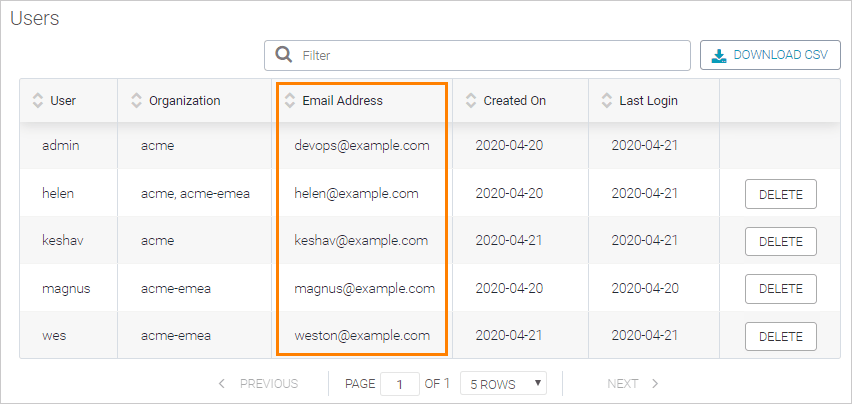
Before enabling SAML or LDAP SSO, review the user list on the License page of the Admin Center and make sure the email addresses of all the existing users (including you, the admin) are the same as in your identity provider.
Users with non-matching email addresses will have to update the email address in their Swagger Studio settings. Otherwise, SSO logins will not be linked to those existing users, and Swagger Studio will create new users.
 |
Sign in
After SSO has been enabled in Swagger Studio, all the users must log in via SSO from now on. Swagger Studio supports both SP-initiated login (when user clicks Log in on the Swagger Studio home page) and IdP-initiated login (when a user navigates to Swagger Studio from the application directory on the identity provider’s site).
User provisioning
Swagger Studio supports just-in-time user provisioning. New users will be created in Swagger Studio the first time they log in after being authenticated by the SSO provider.
Username and email considerations
Email as identification
Swagger Studio uses email addresses to identify users internally. Make sure the addresses of SSO users do not change. If a user’s email address changes, Swagger Studio will not be able to find an existing user in the database and will create a new user instead.
If you need to update the email addresses of SSO users, please contact Support.
Okta (SAML)
Swagger Studio usernames for Okta users are derived from the username part of the email address (before @). For example, a new user with the email address j.smith@example.com will have Swagger Studio username j.smith.
Note that Swagger Studio allows only the following characters in usernames:
A..Z a..z 0..9 - . _
Please make sure the SSO email addresses of your users contain valid usernames. Users with unsupported email addresses will not be able to log in via SSO.
Starting from v. 1.18.2, if another user with the same username already exists in Swagger Studio, a number is appended at the end of the new username to make it unique. For example, j.smith@example.com will become j.smith, and j.smith@acme.com will become j.smith2.
Active Directory/LDAP
When users log in for the first time, their usernames and email addresses are populated based on the values of the sAMAccountName and userPrincipalName fields, or, as of v. 1.18.2, based on the values of the fields specified by the Profile name and Email options.
Starting from v. 1.18.2, the usernames are normalized so that they contain only the characters A..Z a..z 0..9 - . _ and start and end with a letter or number. Duplicate usernames get a number at the end, for example, j.smith, j.smith2, j.smith3 and so on.
Single logout
Currently, Swagger Studio does not support single logout (SLO). When users log out of the identity provider, they remain logged in to Swagger Studio and need to log out from Swagger Studio separately.
Licensing
Any SSO users that exist in Swagger Studio (the ones that logged in to Swagger Studio at least once) count toward the license user limit.
In versions prior to 1.20.1, the internal users that were not migrated to SSO become inactive and do not consume the license. These users will not be able to log in to Swagger Studio. If you switch from SSO back to internal authentication, the internal users will become active again.
Note that Swagger Studio does not automatically remove users who were removed from your SSO provider, so, you need to delete them manually. These users remain in Swagger Studio along with active users and consume the license.
Delete SSO users
Introduced in Swagger Studio On-Premise 1.18.4.
An administrator can delete registered users from Swagger Studio On-Premise to free up license seats for other users.